
Scrollinger is a window manager for the Mac that never squeezes. Every window sits on one horizontal strip, a new one opens right beside the one you're in, and the others keep their size. You move between them with a swipe.
The strip moves, the windows don't shrink. The one you're in is always on screen.
How it works
A strip instead of a pile, and instead of a grid that makes every window narrower. Scrollinger only needs the Accessibility permission. System Integrity Protection stays on.
New windows open beside you. Open an app and its window lands right next to the one you're working in. Close one and the gap closes. Nothing hides behind anything.
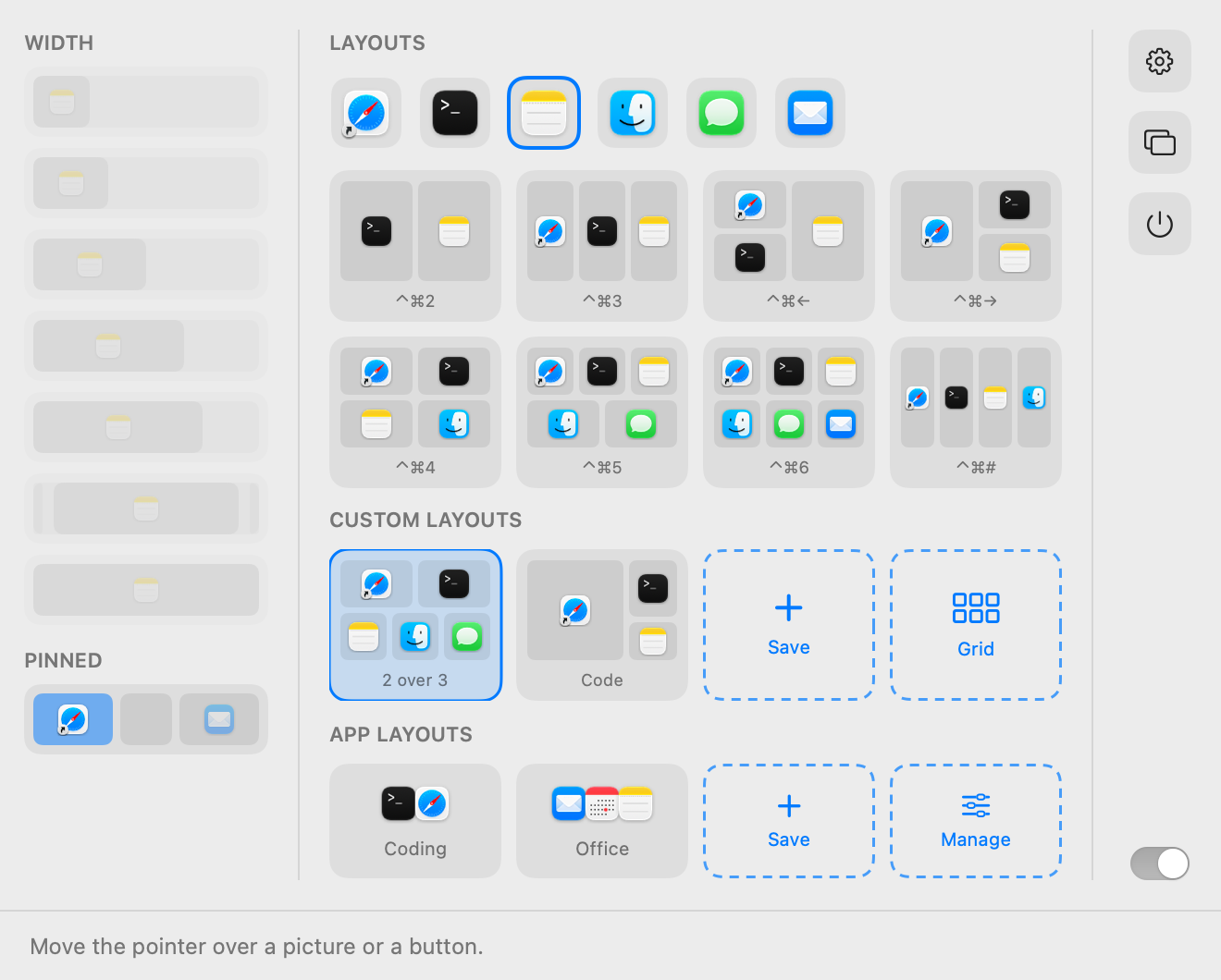
Widths that stay put. A quarter, a third, half, two thirds, three quarters or the whole screen, from a shortcut or the menu bar. Opening another app never reflows the rest.
Stacks and tabs. Put two windows in one column, one above the other, or let them share the space as tabs. Drag a window onto another to choose.
Split screen and grids, one key each. ⌃⌘2 to ⌃⌘6 lay out two to six windows side by side; a tab group counts as one. One more key and they're back on the strip.
Swipe with three fingers. The windows follow your fingers point by point and settle on the one you land on. Prefer a mouse? Hold ⌥ and scroll.
Everything at a glance. Swipe up for an overview of every window on every workspace. Drag one to another place, stack, workspace or display, or drop it in the bin to close it.
A strip for every screen and every task. Each display gets its own strip, and each strip as many workspaces as you need: named, and one shortcut away.
Pin a window to the edge. Keep a chat or a reference at the left or right edge while the strip scrolls past beside it.
All of it in the menu bar
Widths, layouts for two to six windows, your own layouts and your app layouts: one click each. Hover over a picture and it says what it does.
The same panel shows which windows are pinned, and turns Scrollinger off with every window back where it was.
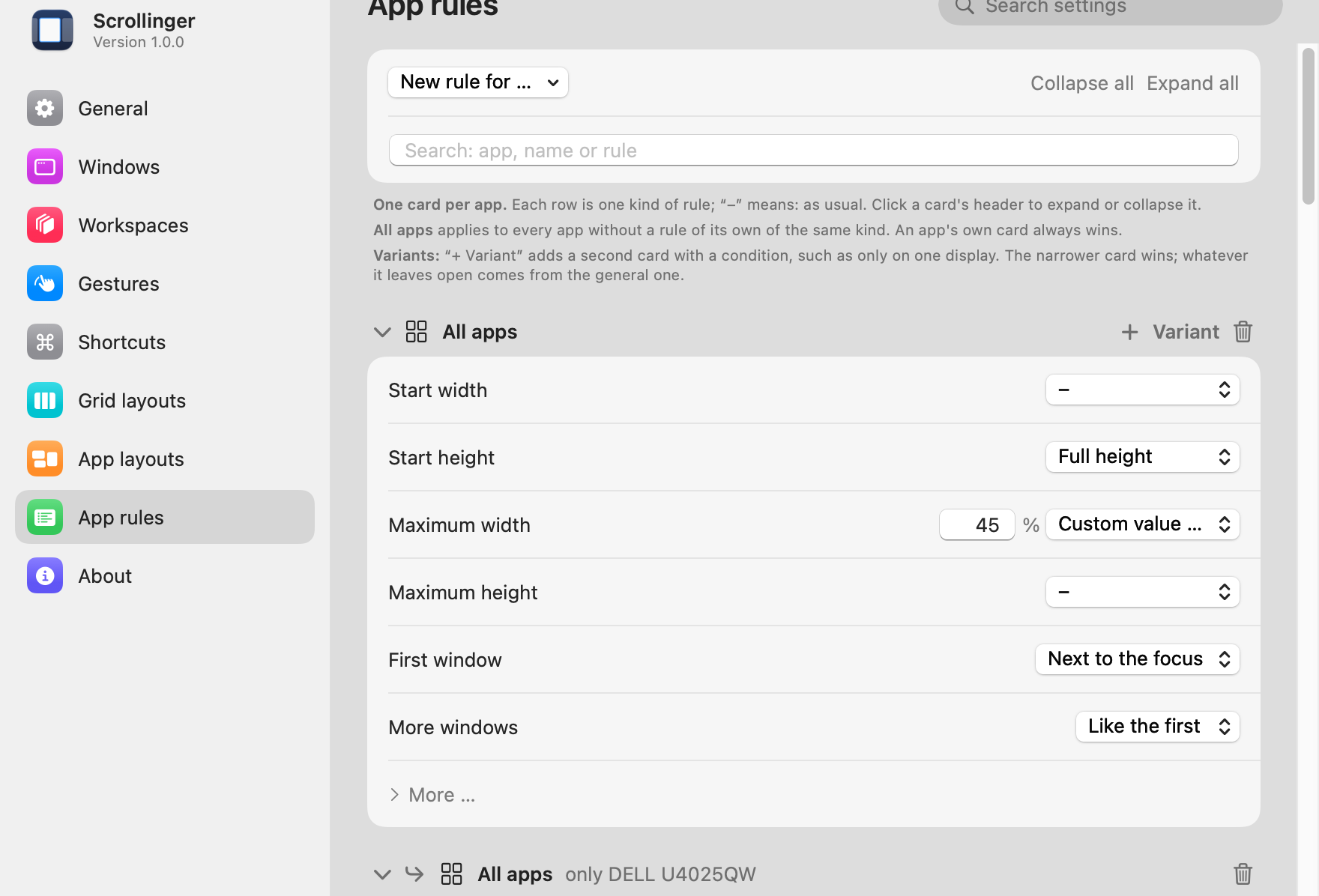
Rules for each app
Let a chat app always open narrow, a calculator float, a reference window open pinned, or Safari start on workspace two. Scrollinger remembers it for every new window, on every display or just one.
And the rest
App layouts. Save how your apps are arranged and bring it all back with one key, or at login.
Every move has a key. Focus, move, resize, stack, workspaces. Change any shortcut in Settings.
Scriptable. scrollingerctl in Terminal, and scrollinger:// links for Shortcuts, Raycast or Alfred.
Peek past the edge. Windows off screen wait as icons at the edge. Drop a file on one to bring it in.
A map in the menu bar. Small bars show the strip and where you are on it.
Picks up where you left off. After a restart your windows go back to their places on the strip.
Off means off. Quit Scrollinger and every window returns to where it was before.
Plays fair with macOS. It tells you which macOS settings get in its way, and where to turn them off.
Private. No account, no analytics, no network access. Your license is checked on your Mac.
- Every 1.x update included
- On all of your own Macs
- Activated with one click, checked offline
- No account, no subscription
- 14-day money-back guarantee
Questions
What is a scrolling window manager?
Instead of piling windows on top of each other or shrinking them into a grid, it lines them up on a strip that reaches past the edges of the screen. Each window keeps the width you gave it, and you scroll along the strip to get to the others.
Do I have to turn off System Integrity Protection?
No. Scrollinger only needs the Accessibility permission, which macOS asks you for once. There is no kernel extension and no helper tool, and SIP stays on.
What happens to my windows when I quit?
They go back to where they were before Scrollinger arranged them. Nothing about the apps themselves changes.
Is there a free trial?
No, but there is a 14-day money-back guarantee. If Scrollinger isn't for you, write to us or reply to your Paddle receipt and you get your money back.
How many Macs can I use it on?
All of your own. The license is personal: use it on every Mac you work on, just don't share it.
Which Macs does it run on?
Macs with Apple silicon on macOS 14 Sonoma or later.
How do updates work?
Every 1.x update is free. Download the new version here and replace the old one; your license and settings stay.
Does it get along with Stage Manager and macOS tiling?
They do the same job in a different way, so it's best to turn them off. Scrollinger tells you which settings get in its way and where to find them.
Is the download safe?
Yes. Scrollinger is signed with an Apple Developer ID and notarized by Apple, so macOS opens it without warnings.
I've lost my license.
Send it to me again: enter the email address you bought it with.
Scrollinger. Windows side by side, never squeezed. Pay once, for Macs with Apple silicon on macOS 14 or later.